
Script Generation Settings
The Script tab controls how RecapSynth rewrites your comic’s dialogue lines and panel descriptions into an engaging, cohesive narration script.
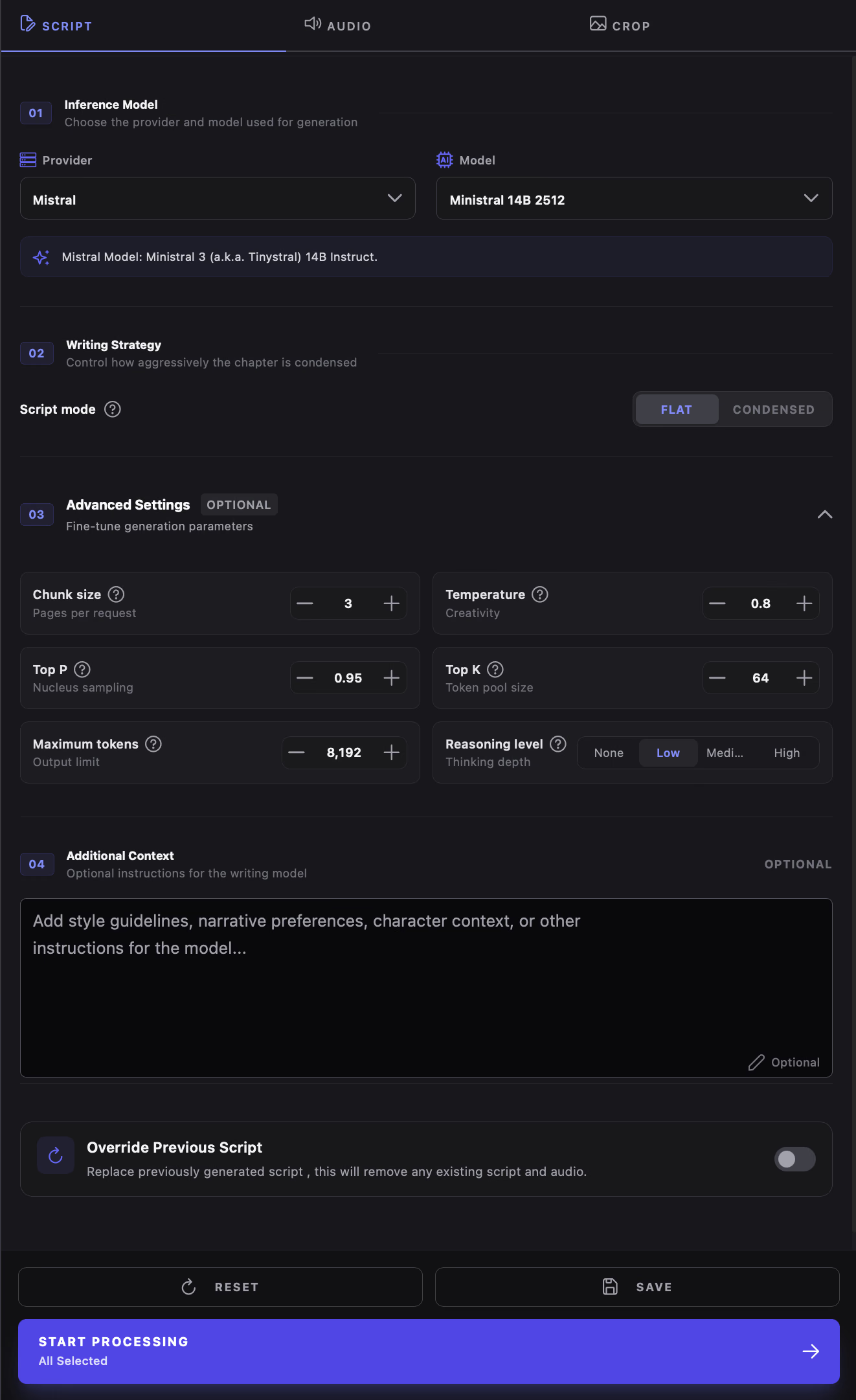
Inference Model Selection
Section titled “Inference Model Selection”Choose the AI provider and model that will generate your narration:
- Provider: Select your AI backend from the dropdown (e.g., Gemini, Groq, Mistral, OpenRouter, or local Ollama).
- Model: Pick a supported model version. The list dynamically loads models available for your selected provider.
- API Key Warning: If the selected provider requires credentials and none are stored, a red alert banner appears. Add your key under Settings → API Keys.
Writing Strategy: Flat vs. Condensed
Section titled “Writing Strategy: Flat vs. Condensed”The Writing Strategy selector determines how the AI structures your script relative to the artwork panels. With the release of our new Condensed Mode, you can now choose between direct panel mapping and cinematic, synthesized narration:

Maintains exact 1:1 alignment with detected panels. The model generates a dedicated narration line for every art box and dialogue balloon in chronological sequence. Ideal for strict panel-by-panel recaps and complex motion graphics.
First synthesizes a continuous, cinematic master script for the entire chapter (omitting filler and repetition). Then, a visual editor pass splits the narration into sentences and maps each sentence to 1–3 matching panel images.
Advanced Settings (Fine-Tuning)
Section titled “Advanced Settings (Fine-Tuning)”Click Advanced Settings to reveal controls for sampling parameters and inference depth:
The number of comic pages sent to the model per request chunk (default: 3). Larger chunks provide broader narrative context; smaller chunks give finer control over fast-paced action.
Sets the thinking budget for reasoning-capable models (None, Low, Medium, or High). Higher levels improve complex plot reasoning and narrative continuity.
Controls randomness. Lower values (0.2–0.5) produce consistent, focused narration adhering strictly to the source. Higher values (0.8–1.2) introduce creative metaphors and dynamic vocabulary.
Nucleus sampling (Top P) and token pool size (Top K) limit word selection to the most probable candidates, preventing chaotic phrasing.
Additional Context & Override
Section titled “Additional Context & Override”Custom Narrative Instructions
Section titled “Custom Narrative Instructions”The Additional Context field lets you inject project-specific guidance directly into the AI prompt:
- Tone & Genre: “Dark fantasy narration; use grave, ominous language for monsters.”
- Character Lore: “The protagonist hides his true identity from the guild master.”
- Pacing: “Keep sentences punchy and concise for high-energy battle sequences.”
Override Previous Script
Section titled “Override Previous Script”When enabled, previous scene scripts for the selected chapters are deleted and regenerated. Any existing voiceover audio linked to those chapters is also deleted to ensure voice tracks stay synchronized with the newly generated script text.